

Seneca - Online Graphing Calculator
Online Homework Resources
Graphing Calculator


GCalc2 is an all-in-one graphing calculator. If that fails to load, try GCalc3...
GCalc 3 is the actual virtual graphing calculator. GCalc 3 contains additional functions and resources for the calculator. Virtual graphing calculator, courtesy of http://gcalc.net/.
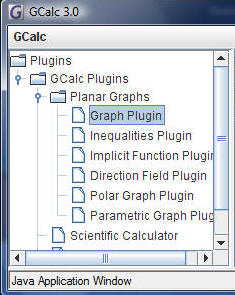
Choose graph plugin (or other selection).
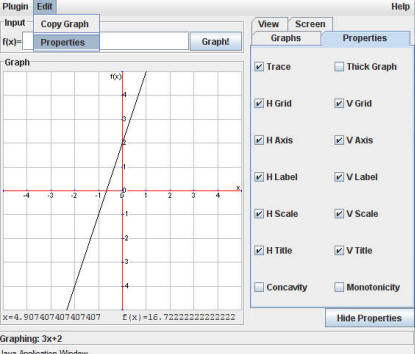
Enter your equation at f(x)= where f(x) is y.
You can then select Edit/Properties to "trace" lines and select other options.
Other Resources
Coordinate Graphs with workspace
Coordinate Graphs without scale (10 x 10)
Coordinate Graphs with scale (10 x 10)
Also remember to check Seneca's Media Center page for more online resources and research paper information.
World Book Encyclopedia
Live Homework Help
3-10pm, 7 days a week, LIVE homework help online, sponsored by the Macomb County Library. Help in math, science, social studies, and English. Up to 20 minutes of live help available from qualified tutors.


